Apply billing escalations
Periodically, the billing rates currently charged to the customer under the maintenance contract will be reviewed. Typically, this occurs once or twice per annum after internal cost escalations have been officially announced and applied. The Contract Manager is usually responsible for negotiating billing rate changes with the customer under the conditions of the maintenance contract document. The output of these negotiations (that is, changes to billing rates) must be entered into the current billing projection for each equipment.
-
Open the relevant equipment and click the MARC tab.
-
In the grid, highlight the relevant Current billing projection and click Edit.
-
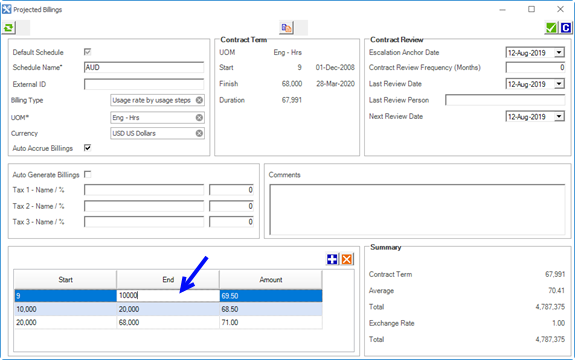
Edit the End value of the current Billing Step (that is, the step in which the equipment's current usage/date falls). In the example below, the equipment's current usage is 10,000 hours.
-
Click Add to add a new escalated billing step and rate.
-
Escalate future billing step rates by modifying the Amount value in the remaining steps in the billing projection.
The start usage at which each equipment moves onto the new rates will be different, because each equipment will have reached different hours on the date new rates were agreed.
 Related Topics